 ClassicLauncher
La idea
The idea
Lo nuevo, con la comodidad de siempre
The new, with the comfort of the old
Queremos disfrutar de openOMSI sin renunciar al menú clásico de OMSI 2: una sola pantalla, sencilla y rápida, donde se ve de un vistazo lo que vas a conducir. No se toca nada de tu instalación de OMSI 2.
We want to enjoy openOMSI without giving up OMSI 2's classic menu: one simple, quick screen where you see at a glance what you are about to drive. Nothing in your OMSI 2 installation is touched.
Mapa, bus, conductor y hora en una pantalla. Todos los ajustes a un clic.
Map, bus, driver and time on one screen. All the settings one click away.
El simulador y su motor, tal cual. ClassicLauncher solo lo inicia.
The simulator and its engine, as is. ClassicLauncher only starts it.
Qué hace
What it does
Todo lo que echabas de menos
Everything you missed
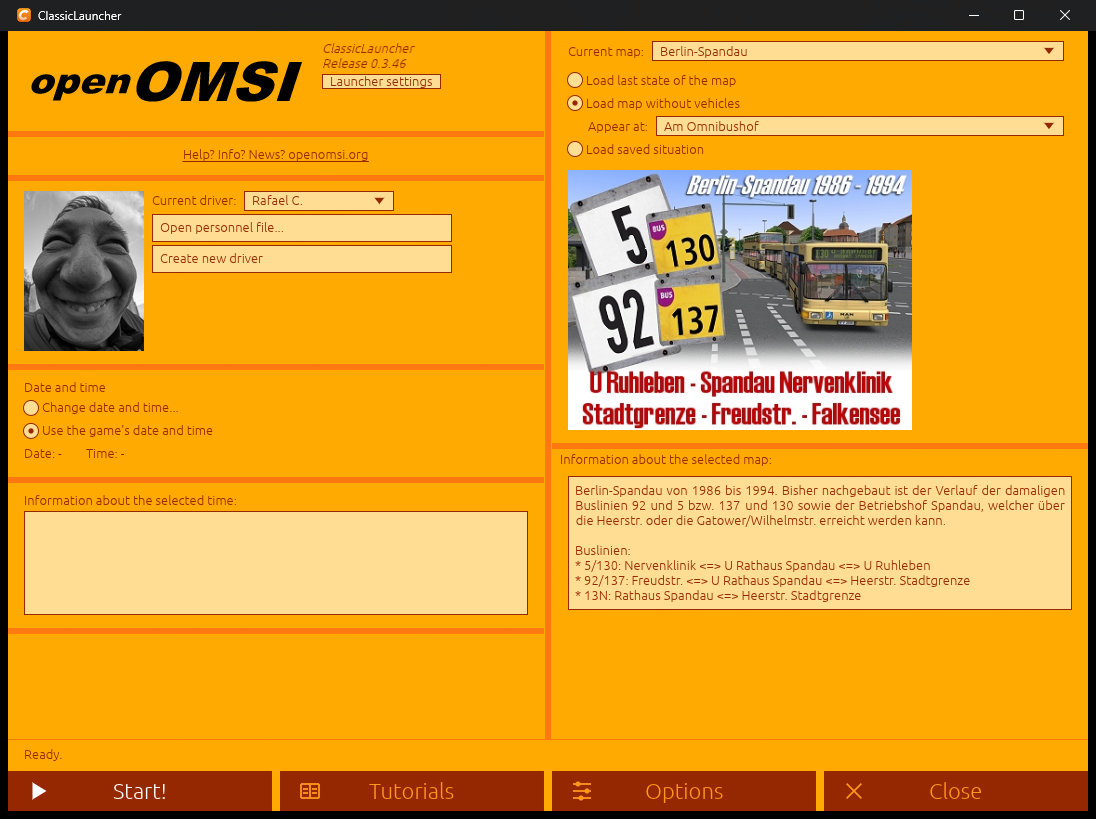
Pantalla de inicio clásica
The classic start screen
Mapa, «aparece en» con los lugares de inicio del mapa, último estado o situación guardada, conductor con su expediente, fecha y hora.
Map, "appear at" with the map's own start places, last state or a saved situation, driver with the personnel file, date and time.
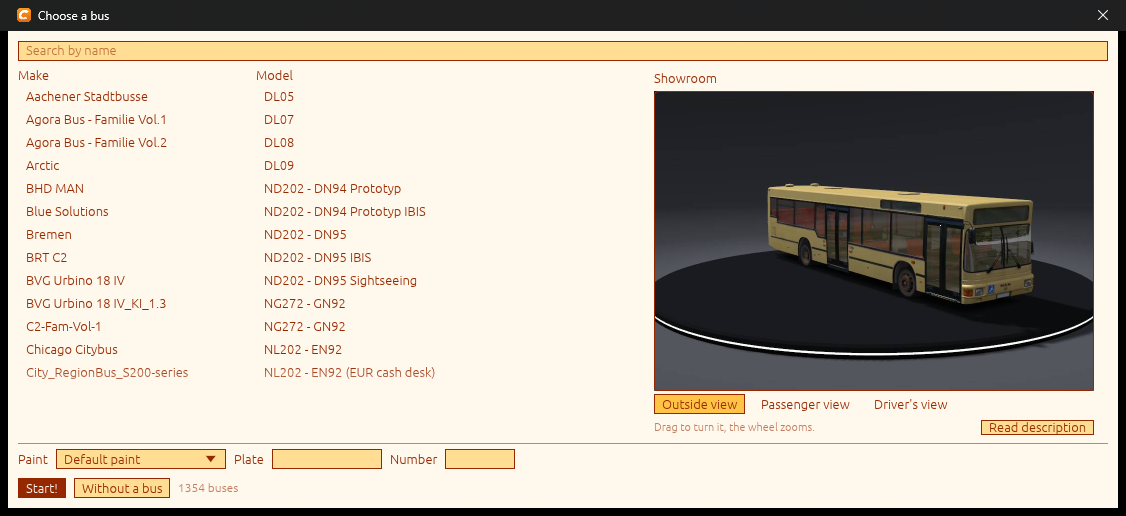
Elegir autobús como en OMSI 2
Choose a bus like in OMSI 2
Marca, modelo y repintado, matrícula y número, la descripción en tu idioma y una exposición 3D dibujada por el propio motor de openOMSI.
Brand, model and repaint, plate and number, the description in your language and a 3D showroom drawn by openOMSI's own renderer.
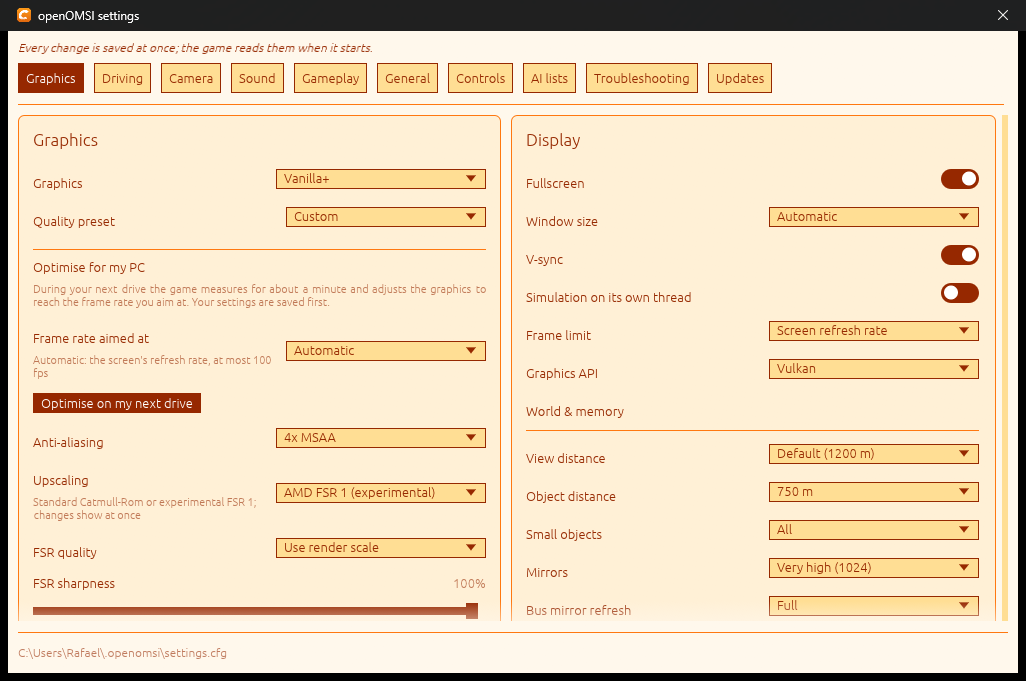
Todos los ajustes de openOMSI
All of openOMSI's settings
Las mismas pestañas que la página del juego, guardadas al instante, con preajustes, perfiles y la prueba de optimización.
The same tabs as the game's page, saved at once, with presets, profiles and the optimise run.
Controles completos
Full controls
Teclas con captura y avisos, mandos leídos como lo hace el juego, ejes en vivo, asistente paso a paso y prueba del sentido de la fuerza.
Keys with capture and warnings, controllers read the way the game does, live axes, step-by-step setup and a force feedback direction test.
Listas de IA
AI lists
Tráfico del mapa con pesos, autobuses de cada cochera con números, matrículas y repintados, y qué tipos corren en cada línea.
The map's traffic with weights, each depot's buses with numbers, plates and repaints, and which types run on each line.
Actualiza openOMSI
Updates openOMSI
Canal estable o beta, cualquier versión a elegir, comprobación SHA-256, prueba del programa nuevo y vuelta atrás si algo falla.
Stable or beta channel, any version to choose from, SHA-256 check, a trial run of the new program and a rollback if something fails.
Solución de problemas
Troubleshooting
La prueba de modelos del juego sobre cualquier autobús, mapa, archivo o carpeta.
The game's own model test on any bus, map, file or folder.
Nueve idiomas, tres temas
Nine languages, three themes
Español, inglés, alemán, polaco, checo, francés, portugués, húngaro y serbio; tema naranja de OMSI 2, oscuro o claro. Las traducciones, salvo español e inglés, no están revisadas por nativos: se agradecen correcciones.
Spanish, English, German, Polish, Czech, French, Portuguese, Hungarian and Serbian; OMSI 2 orange, dark or light theme. The translations other than Spanish and English are not yet reviewed by native speakers: corrections are welcome.